

VDASH Guide
Remote controls and ignition keys Volvo P2
How ignition keys, remote controls, UEM, TRN code, and seed / remote code work in Volvo P2 platform vehicles.
P2 platform
The key and remote control are two separate things
The ignition key and the remote control in Volvo P2 platform vehicles are separate and essentially do not relate to each other at all.
The ignition key allows the vehicle to start, and its code is verified by the central CEM unit, where it is stored. However, each Volvo has its own digital identity, known as the TRN code, which is written back into the ignition key.
These two codes must always match. If they do not, the key will not be approved by the CEM unit and the vehicle will not start, even if the rest of the immobilizer codes in the car match.
Ignition keys
ID48, CEM and IMMO code
For this purpose, the Volvo P2 platform uses a transponder capsule labeled ID48.
With VDASH, ignition keys can be easily uploaded if the immo code is available for your Volvo. VDASH can read this code from most Volvo vehicles through the OBD port, allowing you to delete and add new ignition keys without any additional requirements.
Remote controls
Seed, remote code and the UEM unit
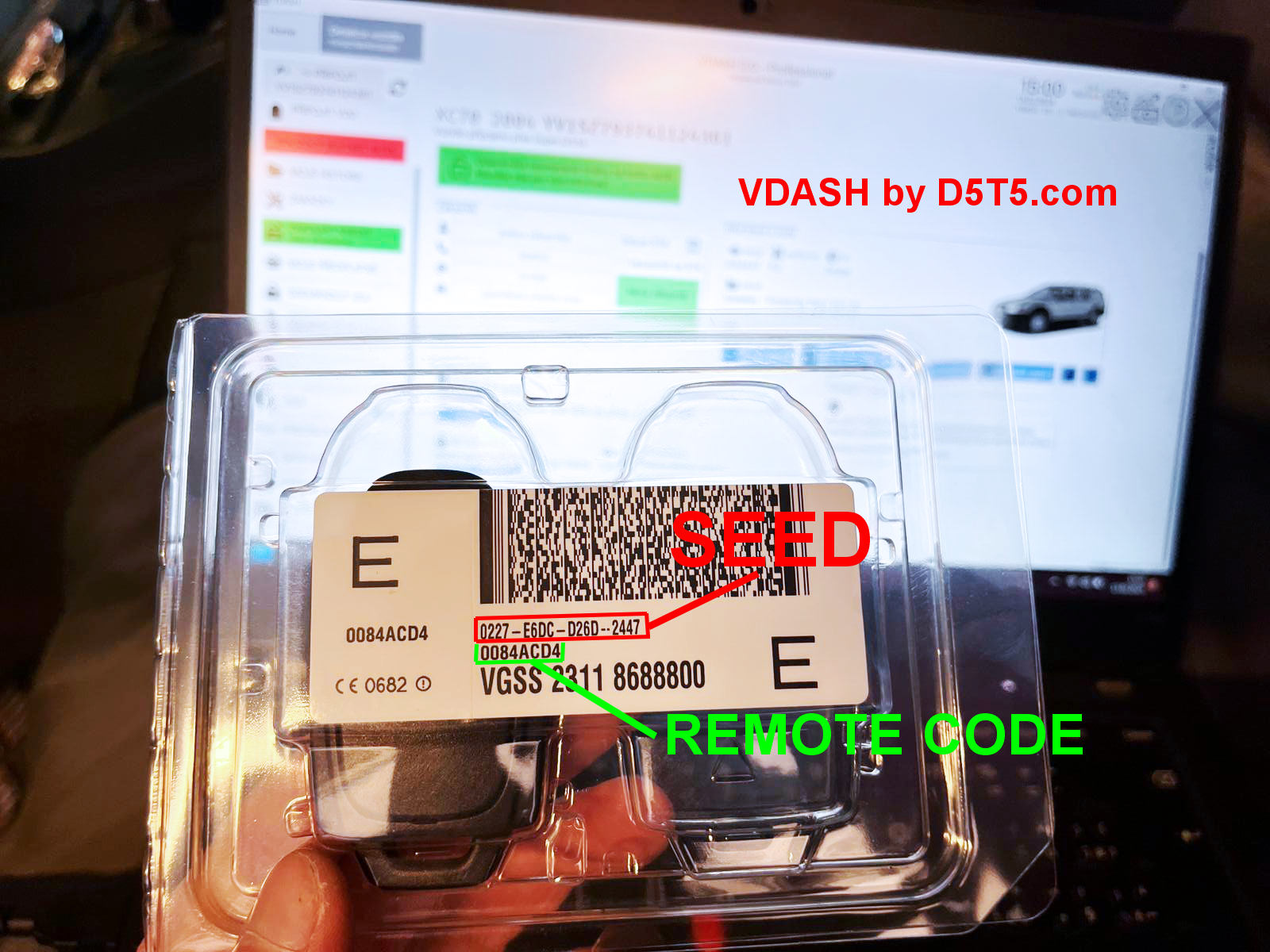
The situation with the remote control is slightly different. The remote control, or more precisely its codes known as seed and remote code, are uploaded to the UEM unit, which is the rearview mirror.
This is why, when replacing a “leaked” mirror with another one from a scrap yard, the remote controls stop working.
With VDASH, however, it is possible not only to add remote controls, but also to clone them or transfer them from one vehicle to another. It is even possible to pair one remote control with multiple vehicles, because the seed and remote code are only uploaded into the car, meaning into the UEM. The vehicle identity, or TRN code, is not uploaded back into the remote control.
Remote control codes
What you need to know
Using VDASH, you can upload a new or used remote control to any Volvo P2 platform vehicle. The only things you need to know are the seed and remote code.
- Seed code: 16 characters
- Remote code: 8 characters
VDASH can extract these codes from any mirror, meaning UEM, and safely store them for future use. However, it is necessary to label the remote control so you can identify it later in the system.
Important: If you only have the remote control and you do not have its codes or the UEM unit, its codes are permanently lost and the remote control cannot be used in the future.
Frequency and compatibility
The correct frequency is required
For the remote control, it is always necessary to pair the matching frequency supported by the UEM unit. Typically, for the EU market it is 443 MHz, and for the USA it is 315 MHz.
You must always use the correct frequency for your Volvo. Otherwise, the remote control will not work because the UEM unit will not “hear” its transmitting frequency.
When transferring remote controls from one car to another, model-year compatibility must be kept within the following groups:
- MY1998 to 2001
- MY2002 to 2003
- MY2004 and newer